Link: https://editor.p5js.org/noahblack/full/koIRB-TzH
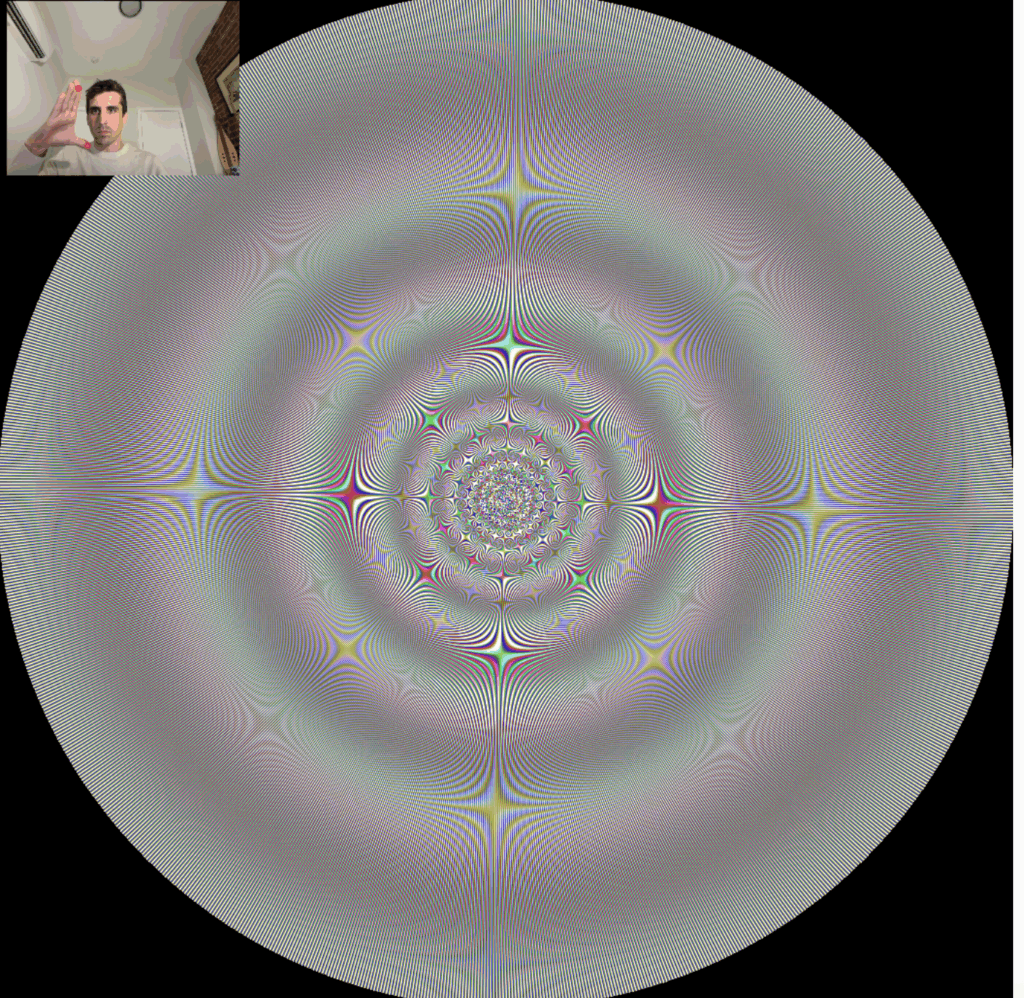
This project began as an attempt to visualize musical dissonance using moiré patterns. The early goal was to map consonant vs. dissonant tone pairs onto spatial interference patterns by treating sine waves as spatial frequencies. The initial prototype used simple gratings, but I quickly found that only rotation-induced moiré patterns behaved predictably. Since I wanted something that felt “circular” and tunnel-like, I shifted toward logarithmic-polar spirals rather than linear grids.
1. Spiral Moiré as a Base Visual Structure
The first stable visual form used two spiral gratings defined in log-polar space:
- radius mapped to a logarithmic axis (
u = log(r)), - angle provided a rotational component,
- phase parameters scaled using two input “frequencies.”
This produced interference patterns that resembled fractal tunnels. The visual complexity changed dramatically based on a reference scaling parameter. Oscillating that parameter with a sine wave produced fractal-like zoom behaviors, though they were not true fractals.
Technical detail
phi = 2π * k * log(r) + arms * θ
intensity = (0.5 + 0.5*cos(phi1)) * (0.5 + 0.5*cos(phi2))
This version established the basic rendering loop: compute per-pixel log-polar coordinates and blend two gratings to create a moiré structure.
2. Real-Time Hand Control (First Attempt: Handpose → Mediapipe Hands)
I wanted the visual parameters to be controlled physically, through hand gestures. The initial attempt used ml5 Handpose, measuring the distance between thumb and index fingertips. This worked, but with poor landmark stability and frequent jitters, especially for the index fingertip.
I replaced Handpose with Mediapipe Hands, which is significantly more stable and supports two hands simultaneously. Both hands were used as independent continuous controllers:
- Left hand → primary fractal parameter
- Right hand → secondary fractal parameter
To convert fingertip distances to smooth parameters, I implemented an adaptive normalization algorithm:
- tracks running min/max fingertip distances,
- slowly drifts back toward defaults if hands disappear,
- rejects large one-frame jumps.
This produced smooth, predictable 0–1 control signals.
3. Audio Integration
Each fractal “plugin” defines:
- a wave type,
- a chord (in semitones relative to a base),
- and responds to two normalized controls.
The main sketch creates an oscillator per chord tone, routes them through a low-pass filter, and maps:
- Left hand → base pitch (log-scaled),
- Right hand → filter cutoff + resonance (for a “wah” effect).
Pitch changes use p5.js’s built-in glide to smooth transitions.
4. Expanding Visual Modes via a Plugin System
I extracted the spiral fractal into its own class and formalized a plugin interface:
class Fractal {
  constructor() { this.name; this.waveType; this.chord; }
  draw(paramL, paramR) { ... }
}
Then added several more variants:
- Rings Fractal (radial interference, no angle term)
- Vortex (multi-mode spiral with angular modulation)
- Ripples (
sin(1/r)-style radial caustics with angular warping)
A dropdown menu selects between plugins. Later, a blink gesture replaces this UI interaction.
5. Experimenting with “Real” Fractals (Mandel / Julia)
I attempted to create Mandelbrot-style tunnels by indexing into the complex plane using log-polar coordinates. These experiments were visually disappointing and extremely slow. Full escape-time iteration over a 1200×1200 canvas at 60 FPS is unrealistic in CPU-bound JavaScript. I removed them from the main interaction loop and kept only the lightweight trig-based fractals.
6. Blink Detection with ml5 Facemesh
To allow hands-free mode switching, I added eye-blink detection using ml5 Facemesh.
Major issue discovered
Facemesh frequently produced corrupted landmark frames, and occasionally threw:
Error: The video element has not loaded data yet...
This led to sudden spikes in the “eye openness” metric and persistent stuck values.
Fix
Delay facemesh initialization until the underlying <video> element has actual pixel data:
cam.elt.addEventListener("loadeddata", () => {
  faceMesh = ml5.facemesh(cam, ...);
});
Once this was corrected, eye landmark data became stable.
Blink logic
- Compute eye openness as average lid-gap divided by eye width.
- Normalize relative to a running “open” baseline.
- Require eyes to remain closed for N milliseconds to count as a mode-switch blink.
- Introduce a calibration phase immediately after the first user click.
After calibration, blink detection became reliable even with lighting variation.
7. Interaction Gating + Canvas Resizing
To avoid unexpected fractal switching before calibration completes, I added:
- interactionStarted flag (set on first click),
- parameters and audio remain frozen until that point,
- blink calibration happens only after the click.
The canvas was updated to resize based on the minimum window dimension, keeping the fractals square:
function windowResized() {
  const s = min(windowWidth, windowHeight);
  resizeCanvas(s, s);
}
The camera preview was mirrored for a natural “selfie” effect using a scale(-1, 1) transformation.
Final State of the Project
The final sketch supports:
- multiple fractal “modes,”
- continuous two-hand control of visual and audio parameters,
- blink-controlled mode switching,
- loads of smoothing and normalization of motion data,
- and full-screen fractal rendering that adapts to window size.